Welcome!

Thanks for visiting my blog. Hope you find some helpful hints for organizing your time and space. My passions are to help you make home a refuge instead of a crisis center, and to help you function in peace rather than chaos - at home or at work. I have switched my main blog to 1-2-3 ... Get Organized on WordPress, so please visit me there.


Showing posts with label Lists. Show all posts

Monday, May 20, 2013

Helping Your Child Organize Packing for Vacation

  
Helping Your Cild Organize Vacation Packing @1-2-3GetOrganized.comCan you believe it's vacation time already? If you help your child get organized beforehand, things are more likely to go smoothly without trauma and drama.

Before you start packing for vacation, do some preliminaries first:

1. If you are flying, check with your airline for current luggage allowance/weight and carry-on restrictions.

2. Count how many days you are going to be gone (including traveling days).

3. Knowing how often each child is likely to spill something or get dirty, add an appropriate number of outfits.

4. Consider where you are going. Check the weather ahead of time so you know if it will blazing hot, rainy, or have some cool temps. My first trip to Montana in May required me to buy a coat, closed shoes and long pants for the snow!

5. Make a list for each child and for yourself or a generic list which can be used by everyone. Whichever you choose, each person should have a list. Create your list on your computer, so you won't have to reinvent your list for every trip - just update it, if needed. We used to travel quite a lot, and having a packing list kept us from forgetting important items.

With list in hand, each child can put together the appropriate number of outfits, including socks, underwear, hair accessoriies, and jewelry as needed. Have your children stack each outfit on their beds so you can check to see if they match and don't have holes or stains.

Armed with gallon ziplocks, place each outfit, socks, underwear, and accessories in one bag. Squeeze all the air out to save room in the suitcase, and mark the bag with the child's name on it. Sure makes it easy when it's time to get dressed - the entire suitcase doesn't need to be rifled through to find an outfit for each child! And you don't end up at the end of the week with non-matching outfits.

Make sure you leave one outfit out for the day you begin your vacation. :-)

For those with children still in diapers, you can toss an extra set of clothes in the diaper bag and use the ziplock for soiled clothes if needed.

Have a backpack for each child in which they can pack items to entertain themselves. Make sure they realize they must carry their own backpacks so they don't overload them and make them too heavy. I always tried to purchase some small toys, games or activity books - one for each child for each day - so they would have a surprise to look forward to and reduce the boredom factor, especially on long car trips.

Bring along some Dramamine just in case someone might have a tendency to get carsick.

I aslo tried to have some car games in mind to make time go faster - alphabet/sign game (look for letters of the alphabet on road signs), 20 questions, etc. One summer my brother and I made a list of all the Dairy Queen, Dairy Marts, Dairy Kings, Dairy-ettes, etc. on our vacation. We could rattle them all off for years afterward!

Audio children's books are a lifesaver! We listened to many children's classics on our long trips - Tom Sawyer, Gulliver's Travels, etc. Children's music is also fun. And if you have a DVD player in the car, it makes time fly. Just don't overdo it - you want to have some quality time as you travel with your family.

If your children are old enough, buy a small scrapbook for them to fill with postcards and mementos of their trip. Provide them with a means to take pictures, whether it's a phone, camera or disposable camera. Bring along crayons or markers so they can draw pictures of their activities each day.

Helping your children get organized before vacation empowers them, reduces your workload, and makes for a more pleasant trip!

Happy traveling!

More on organizing fun:
Three Steps to Planning Your Child's Parties
Organizing Spring Break - Planning in Some Refill Time
Organizing Spring Break Fun

Monday, April 8, 2013

Going Beyond the To-Do List

 
We closed on our new house on Friday, so we've been making trips back and forth, moving the little things. We started with organizational items - shelf expanders, shelving in the garage, shelving in the pantry, wire drawers under our bathroom sink, etc. The big stuff gets moved on Saturday. Hopefully we'll be mostly moved in by then!

Now on to our blog for today ...

Going Beyond the To-Do List @1-2-3GetOrganized.com/blogSo you've made your to-do list. Everything is right in the world. Not so fast. Your to-do list can actually create more stress. Huh?

"Most people's to-do lists actually create fatigue, because they don't clarify how, exactly, they are going to handle Mom's birthday, so tasks feel bigger than they are," says David Allen, a productivity expert and author of the best seller "Getting Things Done."

The solution? Go beyond your to-do list and brainstorm about how you're going to accomplish those to-dos. With this done, you'll have peace of mind, and you'll be motivated to tackle those tasks because you have a plan!

Now doesn't that feel good?


More on productivity:
9 Ways to Enhance Your Health by Being Organized
Wrapping Up  Today So Tomorrow Runs Smoothly
Starting the New Year with Good Sleep Patterns - How Sleep Keeps Your Brain Organized

Monday, November 14, 2011

10 Must-Do Tasks After a Move

  
There are a number of must-do tasks once you have moved. There's so much to do when you move, isn't there?! Here are the essentials:

1. Register your car (need: title, former registration, mileage).

2. Get a new driver's license (need: birth certificate or passport, social security card, driver's license from your previous residence, and proof of residence - a bill with your current address, your lease or purchase papers).

3. Register to vote. This can usually be done when you get a new driver's license.

4. Change your car insurance if you have moved to another state (need: old driver's license number and new driver's license number, car registration). Notify your previous insurance carrier.

5. Change your homeowners/renters insurance. Notify your previous insurance carrier.

6. Register your business, if applicable.

7. Open bank account(s) and safe deposit box (need driver's license, deposit).

8. Restock your pantry and fridge with the basics. 

9. Change your wallet list. This is a list of all your credit cards, bank cards, and other important information that is in your wallet. If your wallet or purse is stolen, you have the pertinent information at your fingertips. Do not put this list on your computer. Keep it in an "important paper" file. 

10. Change automatic deposits/withdrawals from your old bank account to your new bank account before your close your old account.

We still have a couple of these yet to do, but we're making progress!


More on moving:

Short-Term and Long-Term Moving

10 Tips on Preparing for a Long-Distance Move

Storage and Moving Boxes - Think Outside the Box


Monday, January 24, 2011

Organizing Your To-Do Lists Online - 12 Great Choices

    
When researching online to-do lists, I came across the following article by Alyssa Gregory from Web Pro Business reviewing online task management tools. She gives a descriptive explanation of 12 different sites. If you would like to see more tools, take a look at the comments following the article. Here's an excerpt:

"If you don’t have a need for a comprehensive project management tool or overall information management system, a simplified to-do list tool may be a perfect fit for you. Here is a list of 12 online to-do list tools to check out.

Bla-bla List: Bla-bla List is a simple and shareable list tool that lets you publish your lists with RSS, privately share your lists with anyone and e-mail yourself a copy of your list.


e2doList.com: This tool lets you manage tasks in separate lists, add notes and reminders, and share your lists with others.


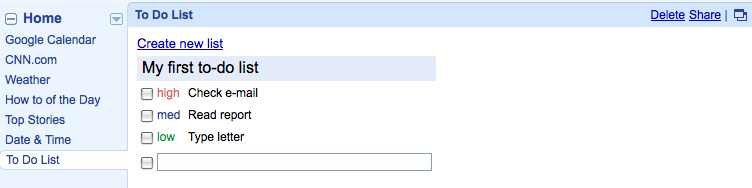
Google To Do List: A simplified way to track tasks and enhance productivity, especially if you are already a Google product user.


The Online CEO: The Online CEO provides a creative approach to tasks as it lets you assign points to each item and has a running points total so you can measure priority and productivity. You can also use a timer to keep track of how long you spend on each task.


OrchestrateHQ: A quick and simple tool for creating and managing multiple to-do lists. You can navigate through your lists, maximizing one at a time.


Remember The Milk: Remember The Milk is one of the most feature-rich task management tools I’ve seen. You can create, manage and organize tasks quickly and easily with extensive keyboard shortcuts. You can receive reminders via email, SMS, and instant messenger; tag your tasks; and locate your location-based tasks on a map. There is also a Pro version that provides an app for iPhone and iPod touch, and MilkSync for BlackBerry and Windows Mobile.


Ta-da List: Ta-da List is a 37signals product that lets you create multiple lists and add, edit, re-order, and remove tasks from each list. You also have the ability to share and create RSS feeds for your lists.


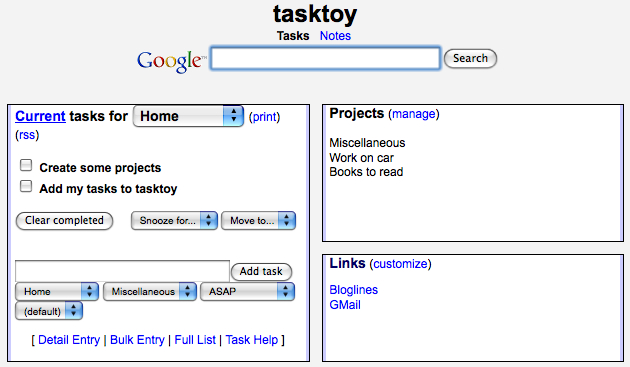
TaskToy: With TaskToy you can create individual tasks with multiple lists, recurring tasks, and use simplified project management actions. You can also print and share your lists, and access your data from your mobile device.


Toodledo: Toodledo allows you to organize and prioritize your tasks in a sortable online to-do list. You can setup e-mail and SMS reminders, and access your lists on your mobile phone, in your e-mail, on your calendar, in your RSS reader, via IM, and integrated directly into your web browser. 


Tudu Lists: Tudu Lists is a very simple open source application that lets you create and share lists, access your lists via an RSS feed, and modify it for your individual needs.


voo2do: This tool lets you organize tasks by project, add tasks by e-mail and track time spent on each task. You can also do some basic task sharing with the tool.


WorkHack: A whiteboard-based to-do list tool that is easy-to-use, supports multiple lists and RSS feeds. You can start using it right away, without signing up."


More on to do lists:

Organizing Your To-Do List

Time Management App for iPhone - Lucid Lists Free

Reduce Your Stress - Say No


Monday, December 20, 2010

Time Management App for iPhone - Lucid Lists Free

     
The following article by Aurangzaib Qumbrani details a new app for iPhones - Lucid Lists Free - to help you stay organized.

"Lucid Lists Free, by Kembipro, is one of the best on-the-move time management applications that I’ve ever used on my iPhone. I’m a college student, and it’s really hard to cope with a day full of tests and assignments. Thanks to this wonderful iPhone app, it’s simple and fast to plan your day ahead.

Lucid Lists Free is designed for those people who have a lot of things to do each day. This app is ready to remind you of almost anything, from calling your girlfriend to crucial office presentations.

Lucid-Lists-Free-iPhone-App

Creating a to-do list for your day is easy and fun. The UI is clean and smooth. New tasks on the app are categorized as “Raw”. “Ripe” means that a task is ready, and if you miss something, that will be tagged as “Rotten”. So make sure you don’t miss any of them. The concept of the Raw, Ripe and Rotten, is very innovative, and I love it.

Download Lucid Lists Free for iPhone
Lucid Lists Free App for iPhone is absolutely free, and you really can’t afford to miss it. You can download this app via Apple’s App Store using this link!" [Download here]
===
About the Author: Aurangzaib Qumbrani authors MadXperts, a technology blog where he shares his personal interests on Apple, Google and Microsoft! He is a dedicated blogger, crazy tweeter, and a freelancer.


More on time management:
Three Steps to Time Management for the Working Mom
Three Steps to Time Management for the Single Mom
Three Steps to  Time Management fo the Stay-at-Home Mom


Thursday, February 25, 2010

Turn Friday Afternoon Blahs into Aaaahhhs


Another 6-12 inches? Come quickly, Spring! Now for today's blog ...


Friday afternoon is a time when it's hard to get motivated to do work. Thoughts turn toward the weekend, and you're drained from the work week.

Change gears! Use Friday afternoon to plan your schedule for next week, evaluating your progress on your goals, and tweaking where necessary. Create a to-do list for Monday morning.

Look over what needs to be in place in order to do what you need to do next week. If there are some things you can do today to lay the groundwork for next week, get those out of the way, if possible.

Friday afternoon is also a great time to file, shred and straighten up your office. These things are important, but not worthy of using your more productive time earlier in the week. You may want to address medium- or low-priority emails and phone calls, if you've been able to tackle those that are high-priority during the week.

While beginning or continuing intensive projects may not be the best use of Friday afternoons, it doesn't mean the time needs to be wasted. By changing your mental gears, you're setting yourself up for a great week next week!

More on using time efficiently:

Uni-Tasking vs. Multi-Tasking
Do You Have a Mid-Afternoon Priority Check?
Trivial and Strategic Interruptions
Three Steps to Time Management at the Office

Tuesday, February 2, 2010

A Personalized Grocery List - Good Time Management


Do you have your own personalized grocery list? It saves time, headaches, and wasted trips!


I created my own grocery list several years ago. Now, when I plan my menus, I take out one of my printed grocery lists and start to work! At the top of my list I have seven boxes, one for each day of the week, where I write the menu for each day.

Below the menus, I have four columns of grocery items, in the order in which my grocery store is laid out. I've listed those items with which I cook. I also have a few blank lines so I can write in items I don't often use.

I have a red chalk board in the my kitchen upon which I write items I'm running out of as I'm cooking. You could, however, just stick your grocery list on your fridge, and check off the items you need.

An advantage of having your own personalized grocery list is that, as you skim your list, you are reminded of the staples you like to have on hand before you run out. You don't even have to write a list! If you really want to look like a dork, stick that baby on a clipboard - it's much easier to handle (speaking from a dork's experience!).

Oh, and print your lists on recycled paper that has been used on one side. If you really want to be thrifty, print it using draft mode to save ink.

Happy grocery shopping!


More on grocery shopping:

Six Ways to Save Money on Food by Planning Ahead
10 Ways to Streamline Your Shopping Time
Increasing Efficiency

Monday, February 1, 2010

Forget-Me-Not Lists


Do you find yourself forgetting things as you leave home?

Create a forget-me-not list or two. Make them according to the bag you're taking. Make them according to the place you're going.

For example, make a list for your briefcase, purse, diaper bag, work out bag, the car, etc. Or make a list for business trips, regular meetings, grocery shopping, church, day care, etc.

Tuck your list inside the corresponding bag so you can take a quick look before you walk out the door.
Or stick your list(s) on your fridge, by your keys, by the door, or another logical place.

What a time saver, to get to where you need to be with everything you need! And how frustrating when you forget something important!

For an even calmer exit, check your lists the night before and replenish and organize as necessary.


More on lists:
Increasing Efficiency
10 Ways to Double Your Time
Lists for Repeated Activities

Thursday, November 19, 2009

Destressing Christmas, Part 8, 2009 - An Online Tool to Consolidate Wishlists


Getting tired of buying gift cards because you don't know what someone wants? Wishpot takes the guess and stress out of shopping. According to their website: "
Wishpot makes it easy for you to shop anywhere, keep all your finds in one place, connect with friends, and discover the hottest deals."

What you do is shop all over the internet, consolidate your wishlist at Wishpot, and you can share your list with others! Take some stress out of your life and request your family members to join Wishpot (it's free)! Join yourself, so others know what you want. Why not pass the destressing around? :-)

More on Christmas shopping:
Destressing Christmas, Part 3, 2009 - Smart Gift-Giving
10 Ways to Streamline Your Shopping Time
Christmas Shopping Ideas from 1-2-3...Get Organized Plus a 10% Discount

Thursday, November 12, 2009

Thanksgiving Survival Guide from Cozi


Once again, Cozi has provided us with a survival guide for preparing Thanksgiving dinner.

If you're not familiar with Cozi, they are the folks that offer a free online family calendar. If you don't have a calendar that works for you, check them out!

What do you do to destress Thanksgiving?


More on Thanksgiving:

Destressing Christmas, Part 6, 2009 - Planning Holiday Meals
Organize for the Holidays
Tackle the Clutter before Christmas
Three Steps to Planning Dinner

Thursday, October 8, 2009

Creating a Cleaning List


Our new home is quite a bit larger than our previous one. So my husband and I have made a new list of cleaning duties. There are several different cleaning philosophies, one of which is doing a little each day - that's the one we prefer these days. We have used others in the past, but this is the one that works for us right now.

When making our list, we considered what else was going on that day. We divided up the chores, including outdoor work. Now we each have a cleaning task(s) to do each day. We also made a list of monthly cleaning jobs and decided when to do those.

I like to do my cleaning in the afternoons when the girls are home from school. I can be interrupted and can chat with the girls while cleaning. That allows me to use the times when they are not at home for other work which is best done without being interrupted. My husband, on the other hand, likes to do his cleaning first thing in the morning to get it off his mind.

I've posted our list on our refrigerator so we can be reminded of our new schedule. I think it's good, too, for the girls to see what it takes to keep a home running well.

If you're feeling at a loss of where to start, my book Three Steps to Clever Cleaning helps you determine your cleaning philosophy and gives tips for streamlining your cleaning so you can get on to more fun stuff! It also provides a schedule for infrequent cleaning chores.

I know there are those out there who love to clean and I applaud you! But alas, I'm not one of those. I do love a clean house, though, and am willing to spend the time to keep it that way. Plus I'm sending a subliminal message to my foster daughters that they are important enough to me to provide them with a clean and attractive place to live. It's part of my desire to create an atmosphere for their success.

What are your cleaning secrets?

More on cleaning:

Schedule Daily Clean Up Times
The Best Time of Day to Clean the House
Get Organized Month 2009 - Family Five Minute Challenge

Friday, August 28, 2009

Organizing Your To-Do List


Overwhelmed by all you need to do? Write it down! Make a list of everything you need to do.

Next, assign a day to each task. Those things that are most important and urgent should be assigned to an earlier day. Beside those items you will do on Monday, write an M. Put a T beside the things you will do on Tuesday, and so on.

Then, look at the items you have on your list for today. Prioritize them by putting a 1 beside the most important and urgent item on the list, 2 on the next, etc.

By tackling #1 on your list, you know you are doing the most critical task on your list. Even if that’s the only thing you accomplish today, you know you have spent your time on the highest priority item on your list.

Transfer today's prioritized list to today's page on your calendar. Transfer your lists for each day to the corresponding day on your calendar


At the end of today, compare undone tasks on today’s list with those items on tomorrow’s list. If necessary, reprioritize your list for tomorrow. By doing this tonight, this allows you to get started quickly on your day tomorrow with your most critical task.

As a result of creating and prioritizing your to-do list, you may realize that it is humanly impossible to do all the tasks on your to-do list. You will need to delegate, ask for help, or lower your expectations.

As things came to mind, add them to your list so everything is in one place. If you write things down, you won’t have them rambling around in your mind, and you won’t forget them!

By creating and prioritizing your to-do list, you stay focused on what you need to do, you're motivated to use your time well, and you are forced to live in reality as far as what you are humanly able to accomplish.

More on priorities:
Your Priorities, Passions, and Gifts Create Context for Your Clutter
Announcing My New Coaching Package - Rethinking Life
The Effects of Disorganization at the Office
Get Organized Month - Declutter Your Schedule - Take Some Time Off!


Comments? Subscribers, click here to comment at the end of the original blog.

Monday, August 24, 2009

Getting Organized for School - Start the Night Before


Wouldn’t you love to have a peaceful, stress-free morning tomorrow? Starting the night before can help eliminate the rush and push, getting your day off to a pleasant and calm start.

Getting Your Child Organized

Knowing how much sleep your child needs is essential to his/her well-being and success at school. Trying to function well in a sleep-deprived stupor is impossible.

I feel strongly that a huge role of mine as a mom and foster mom is to create an atmosphere where my child can succeed. In order to insure that my children get enough sleep, I work backwards:

- I figure out when my child needs to be in bed with the lights out in order to get the sleep she requires. We have five foster daughters in our house this week. One starts school today, two tomorrow and two on Thursday. We are reining in bedtime so everyone can get enough sleep.


- We determine how much time is needed for nightly routines – shower/bath, brushing teeth, room decluttering, prayers, reading, etc. – and start the routine that much earlier than bedtime. With five girls and one bathroom between them, we are starting at 7 to get them all in their rooms by 9!

- Next, we figure out how much time is needed for morning routines - shower/bath, brushing teeth, breakfast, etc. Each child sets the alarm to allow enough time for her morning routine to be accomplished without rush. We have one child who is younger than the rest, and has trouble judging time. When she first came, we wrote out a timed schedule of what she needs to do in the morning and how much time it should take.

- We encourage each child to choose her clothes for tomorrow and lay them out.

- Before choosing her clothes, she should have packed her backpack – homework assignments, permission slips, gym clothes, etc., checking her backpack checklist (see post on July 30, 2008).

- Before packing her backpack, she can pack her lunch and put it in the fridge. If she doesn't want to make a sandwich the night before because it will get soggy, at least she can pack everything else and know which kind of sandwich she will make in the morning. (I must confess, I made my girls’ lunches throughout high school. For some reason it stressed them out, and I didn't mind doing it.)

Getting Yourself Organized

If I am running behind in the morning, it makes life stressful for everyone! So I try to create the same type of routine for myself. If I am sleep deprived, I get crabby and little things that shouldn't bother me trigger inappropriate responses.

- I need to know how much sleep I need and determine when I need to be in bed with the lights out in order to get it.


- Working backwards again, I calculate how much time I need for my nightly routine and start the routine that much earlier than bedtime.

- During my routine, I think through what my morning routine will be and how much time it will take, including fixing breakfast and making sure everyone else gets out the door on time. I set my alarm to allow for that to happen without panic. Ten minutes can change panic to calm, so I try not to cut my morning routine too short.

- Before I start my evening routine or during my routine, I think through what I'm going to wear tomorrow and make sure it's clean, ironed, etc.

- Before that, I think through my schedule for tomorrow and pack my briefcase and/or purse and/or gym bag (backpack or diaper bag for some of you) with what I need for the day tomorrow. I'm much less likely to forget something if I can think it through calmly.

- If I'm going to need a lunch, I'll prepare it before I pack my bag and stick it in the fridge. If I take leftovers from dinner, I try to package them while putting the food away after dinner.


- While I'm packing my lunch or while preparing dinner, I look to see what I have planned for breakfast. When I plan my meals for the week, I also plan breakfasts so I can get what I need when I do my weekly grocery shopping.

- After dinner is a good time to set the table for breakfast. If you have two tables - one in the kitchen and one in the dining room, you can set both whenever you empty the dishwasher - one for breakfast and one for dinner.

It’s a lot to think about, isn’t it? It’s easy to see why time slips away without even realizing it. But by being intentional about your evening schedule, you’re creating an atmosphere of success for both your child and yourself which will hopefully result in a peaceful and productive day tomorrow!


What do you do to get your day off to a good start? Subscribers click here to comment on the original blog.

More on Organizing for School:
Getting Organized for School - Family Calendar
Getting Organized for School (and life!) - Getting Enough Sleep
Getting Organized for School - Creating a Hub

Three Steps to Time Management for the Working Mom

Friday, July 17, 2009

Increasing Efficiency


Ever feel like that hamster in a cage, moving but not going anywhere? Here are a few ways to increase your efficiency and productivity.

- First and foremost, know your priorities, passions, and gifts. Use these as filters for incoming opportunities and requests. If you're not sure what is important to you, you may be controlled, by default, by others' agendas.

- Create a master weekly schedule that includes your priorities, passions, and gifts. Use this as you plan your schedule each week. If your schedule is erratic, create a master list.

- Say no to those activities which do not contribute to your objectives. If that’s difficult, ask for some time to think about it, compare it with your priorities, and then say no. If you're unsure about whether or not to pursue the opportunity, get some advice from your spouse or close friend who is aware of your priorities and commitments.

- Find ways to simplify your life, schedule, etc. Remove activities from your life about which you are no longer passionate. Remove clutter from your life.

- Create systems and routines for handling paperwork, daily/weekly activities, etc.

- Delegate whenever possible. Train your delegees well, whether it is on the job or doing house chores! And plan a time to follow up.

- Make lists. Write down what you need to do, to remember, to buy, etc., rather than waste time later trying to remember them.

- Plan your errands strategically so as to save drive time and gas.


- Avoid people who are time-wasters, unless you feel “called” to that relationship. Use email or texting when you must communicate with them so as not to be trapped by their lack of control. Or call them five minutes before a meeting or similar commitment, thereby limiting your conversation time.

- Determine if an emergency or interruption is urgent and important or just urgent before you change your scheduled activities. Just because it may be an emergency for someone else, doesn’t necessarily mean it must become an emergency for you!

- Don’t check your email first thing in the morning; instead, do your highest priority.

- Prepare the night before so your morning will run smoothly.

- Keep well-stocked on the essentials - milk, bread, toilet paper, etc. Milk and bread can be frozen (use milk with screw on cap and pour out a little milk before freezing to allow for expansion). This prevents costly (both time and money) emergency trips to the grocery store.

- Make a master list of school supplies your children use frequently. When you go to the office supply store, check your list to avoid running out of an essential. At the beginning of the school year buy project supplies as well as school supplies - markers, colored pencils, poster board, report folders, etc.
When your child has a last-minute project, you'll be prepared! No more late-night trips to the grocery store hoping they'll have poster board.

-
Do the same with office supplies. Make a list of essentials - paper, ink, labels, legal pads, binders, etc. Each time you go to the office supply store, check your list. Many office supply stores will deliver if your purchase is over $50.

- Compare prices between local office supply stores and online stores. I have found quality computer ink, shipping supplies, and other items at cheaper prices than my local stores, many times with a better selection. And I don't have to go anywhere!

- Use small snatches of time to do quick tasks. Save large blocks of time for big projects. If you have projects that require lengthy attention, create "no interruption" times during your day. Schedule times when you are available to field questions, phone calls, etc. Record this information on your answering machine.

By increasing your efficiency, your day will be more productive. And you may be able to find some extra time in the day for yourself!


Comment? Subscribers, click here to comment on the original blog.

More on time management:

The "Do It Now" Mindset
Increasing Your Effectiveness at Work
Six Ways to Save Money on Food by Planning Ahead


To Discover your passions, priorities, and gifts, see any of the time management books in the 1-2-3 ... Get Organized series.

Wednesday, September 3, 2008

Celebration Giveaway #2 and Another Giveaway!

I'm celebrating #17 of my 1-2-3...Get Organized series - Three Steps to Becoming a Downsizing Professional. It's a manual for those who want to pursue a career in helping people downsize to a smaller residence.

My giveaway for today is Three Steps to Organizing Your Kitchen. To win, leave a comment below. To find out how you can submit more entries, go to Celebration Giveaways September 2-9, 2008!

Visit Sweet 'n Sassy Girls for another giveaway. See Giveaway #1 for others going on this week.

Related Posts: Celebration Giveaway #1 and More Giveaways!, Celebration Giveaways September 2-9, 2008!

Wednesday, July 30, 2008

Getting Organized for School - Backpack Checklist

With school starting next month for many next month, I want to run several blogs on getting organized for school. The inspiration for today's blog came from The Disney Dream Team's Tracy, who created a system for remembering what needed to go to school with each child.

While Tracy's system targeted her elementary school children, a backpack checklist would work for middle school, high school, and college students. This could even work as a briefcase reminder for work, too. This is how it works:

Create a chart listing the days of the week at the top. Under each day, make a column for each person who needs a checklist. On the far left, list possible items that might need to be included in the backpack that day: a band instrument, shoes for gym, signed paperwork, a folder or notebook for a particular class, library books, etc.

You can create your chart on your computer and reproduce it each week. Or you could use a dry erase board or laminate a poster board to re-use each week. Each person on the chart could be noted in a different color. Then items can be checked off on the appropriate day as a reminder to put those things in the backpack. Make sure you leave extra rows at the bottom for items that aren't necessarily needed each week.

To make life easier, have everyone pack their backpacks the night before. What a morning stress reliever!

What do you do to take the stress out of your mornings?

Related posts: Organizing for School - Papers, Get Organized for School - Clothing Inventory, Hope for Disorganized Students!, Getting Ready for School: Organizing Homework Papers

Thursday, July 24, 2008

To Do List or Not To Do List - That is the Question!

I ran across an article today in MomSense, a newsletter put out by Christianity Today that I thought was extremely refreshing. It's about giving yourself permission to take things off your to-list that are good, but may not be good for you. It encourages you to determine what's important to you, and not compare yourself to others. It sings my theme song! And you don't need to be a mom to appreciate the message. For a wonderful, freeing read, click the title above.

Wednesday, July 16, 2008

Keeping First Things First

Summer is whizzing by!! With organizing meals for our foster children as well as coordinating doctor's appointments, summer school, and fun activities, it's hard to have time for myself!

I have in mind two or three things I consider most important to accomplish each day. When I have some free moments, I tackle the one on the top of my list. Next, the second, and then the third if I get a chance. Remember "refill time" I mentioned in my blog on June 17 - alone time for each of the girls and for me? That's when I try to get to those important items on my list if I haven't done so beforehand.

What are your top three items on your list? Mine include spending time with God, exercise, and writing my blog. I'd love to hear yours!

Related posts: Refill Time

Wednesday, July 2, 2008

Christmas in July

You thought I was planning early yesterday - today it's Christmas!

We are on vacation in Branson, Missouri with my parents, my sibilings and their families. Yesterday we went outlet shopping - usually a tradition when we have these vacations.

Even though Bob and I didn't need much, we took the opportunity to do some Christmas shopping. So we picked up some gifts for our foster daughters and our own daughters. My sister-in-law Debbie was the Christmas shopping queen, blasting through her Christmas list.

To ease your Christmas stress, sit down soon and make a list of all the people to whom you want to give Christmas gifts. If you have gift ideas for people on your list, jot that down, too. Put your list in your wallet or purse and refer to it before you head out on a shopping trip.

Then, as you shop on vacation, do school shopping or other shopping, you may run across gifts for those on your list. How nice to get your Christmas shopping done while you go about life, rather than having to take out extra time to do your Christmas shopping! You will not have to "settle" for gifts because you've waited until the last minute and the selection is sparse and expensive.

What are your Chistmas shopping secrets?

Friday, June 27, 2008

Need a Family Checklist for Your Summer Travel?

Are you planning to travel this summer? Laura at I'm An Organizing Junkie has created a Family Checklist to streamline packing for the whole family. Take a look at it by clicking the title above. While you're there, take a look around her site for some great ideas and bargains!


I have put a list on my computer for myself when I travel, but Laura has made a chart with spaces for several family members. It's in PDF form so you can save it onto your computer.


What do you do that makes travelling easier for you and you family?